s&box
RustCounter-Strike 2s&boxDeadlock
Wiki
Get s&box on Steam
Browse
OverviewGetting StartedCreating GamesEngine & ToolsDocumentationCommunity GamesResources
s&boxDocumentationScenePrefabsPrefab Templates
SOURCE 2 · C#
Build and play games with s&box.

Facepunch's game engine and creation platform — make games in C#, or jump straight into community games.

Get s&box on Steam

s&box Wiki

  • Overview
  • Getting Started
  • Creating Games
  • Engine & Tools
  • Documentation
  • Community Games
  • Resources

Tools & Community

  • Getting Started
  • Creating Games
  • Engine & Tools
  • Resources

Platforms

  • RustBattle
  • CSBattle
  • Rust Game Wiki
  • CS2 Skins Wiki
  • Deadlock Wiki

About

  • Official Site
  • Developer Wiki
  • GitHub
  • Get on Steam
NOT AFFILIATED WITH FACEPUNCH STUDIOS · © 2026 s&box Wiki (community)
Docs/Scene
Scene

Prefab Templates

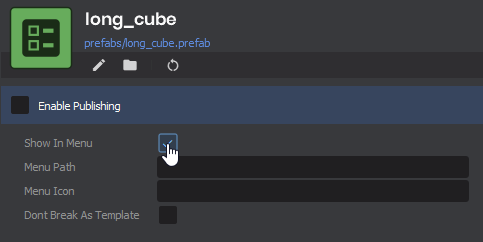
If you want to add your own templates to the GameObject Create menu, it's as simple as enabling "Show In Menu" on a Prefab File:
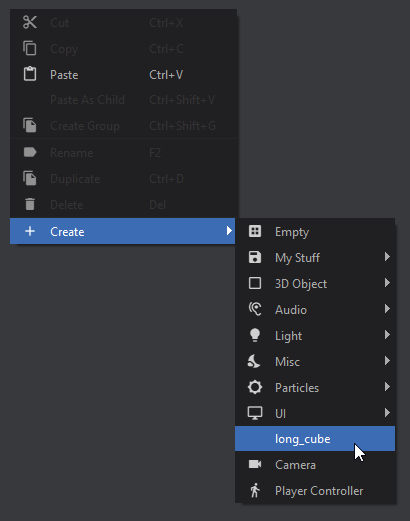
Now you'll see your template as one of the options in the Create menu
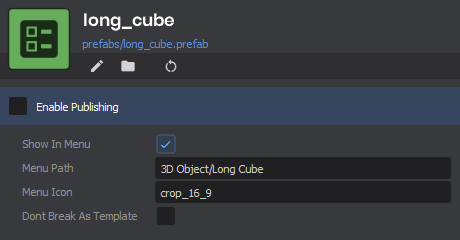
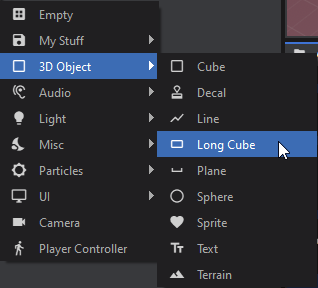
You can make it look nicer by fiddling with the other variables, and even throw it in a sub-menu:
The final option is whether or not the prefab should be treated as a template. Templates will always break the prefab when created, otherwise the prefab reference will be maintained:

DontBreakAsTemplate = false VS DontBreakAsTemplate = true 508x544

Source: Facepunch/sbox-docs (CC-BY-4.0) · updated 2024-11-08. Read it rendered on the official docs.

More in Scene

Advanced Topics
Async
Camera Effects
Component Interfaces
Component Methods
Component Versioning
Components
Events
← All documentation

Community wiki — not affiliated with Facepunch Studios. For the latest and most authoritative information, see the official developer wiki.