s&box
RustCounter-Strike 2s&boxDeadlock
Wiki
Get s&box on Steam
Browse
OverviewGetting StartedCreating GamesEngine & ToolsDocumentationCommunity GamesResources
s&boxDocumentationGetting StartedInstallation
SOURCE 2 · C#
Build and play games with s&box.

Facepunch's game engine and creation platform — make games in C#, or jump straight into community games.

Get s&box on Steam

s&box Wiki

  • Overview
  • Getting Started
  • Creating Games
  • Engine & Tools
  • Documentation
  • Community Games
  • Resources

Tools & Community

  • Getting Started
  • Creating Games
  • Engine & Tools
  • Resources

Platforms

  • RustBattle
  • CSBattle
  • Rust Game Wiki
  • CS2 Skins Wiki
  • Deadlock Wiki

About

  • Official Site
  • Developer Wiki
  • GitHub
  • Get on Steam
NOT AFFILIATED WITH FACEPUNCH STUDIOS · © 2026 s&box Wiki (community)
Docs/Getting Started
Getting Started

Download & Install

The s&box editor and game are available on Steam.

Install
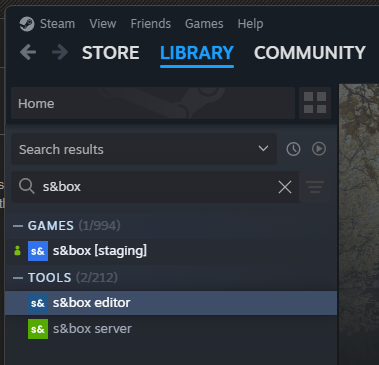
Launch the editor from your Steam library

To install s&box click here or:

  1. Open Steam
  2. Click on the Library tab
  3. Search for s&box
  4. Install both the game and the editor apps

Launch

You can launch s&box in several ways:

  • Launch through Steam directly
  • Use a shortcut to sbox-dev.exe
  • Open your .sbproj file directly

Building from Source (Optional)

The s&box engine is open source and MIT licensed. If you'd rather build it yourself, you can compile and run the engine from source.

Everything you need is in the sbox-public repository, clone it and follow the build steps in the README.

You only need this if you want to contribute to the engine or poke around its internals. For making games, installing through Steam is the recommended path.

Source: Facepunch/sbox-docs (CC-BY-4.0) · updated 2026-04-09. Read it rendered on the official docs.

More in Getting Started

Addon Project
Explore the Engine
FAQ
Game Project
Getting Started
Monetization
Project Types
Reporting Errors
← All documentation

Community wiki — not affiliated with Facepunch Studios. For the latest and most authoritative information, see the official developer wiki.