


To make a multiplayer game you need to take care of a few things. There's a special component that helps with those things, called NetworkHelper. This is a simple component that fits a lot of situations, but can be used as an example to code your own network component.
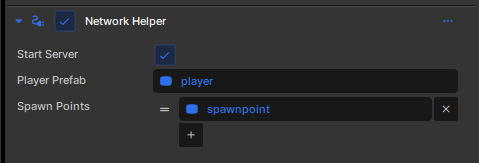
If the StartServer property is enabled, a server will automatically be created when the scene is loaded. That is unless the network system is already active (because you're joining a server using this scene).
When a player enters a server you need to create an object for them to control. If it's a racing game, you'd spawn them a car to control. If it's a shooter game, you'd spawn them a player.
Generally this is done using a prefab. You define your player gameobject and create a prefab, then you can drag the prefab object into the PlayerPrefab property on the component.
You can also define a list spawnpoint GameObject's. The player will spawn randomly on one of them. If you don't define any spawn points, any SpawnPoint components in the scene will be used instead. If there are none of those either, they will spawn at the location of the NetworkHelper object.
Your player object will usually contain a component with a function like this, which controls the GameObject if it isn't a Proxy.
	protected override void OnUpdate()
	{
		// If we're a proxy then don't do any controls
		// because this client isn't controlling us!
		if ( IsProxy )
			return;

		// direction keys are pressed
		if ( !Input.AnalogMove.IsNearZeroLength )
		{
			WorldPosition += Input.AnalogMove.Normal * Time.Delta * 100.0f;
		}

		// position the camera
		var camera = Scene.GetAllComponents<CameraComponent>().FirstOrDefault();
		camera.WorldRotation = new Angles( 45, 0, 0 );
		camera.WorldPosition  = WorldPosition  + camera.WorldRotation.Backward * 1500;
	}
NetworkHelper works by implementing Component.INetworkListener. This interface contains a method that is called when a connection becomes active on the server.
In this method we create an instance of the PlayerPrefab and set the new client as its owner. The client receives the information about this new object, and the fact that they're the owner, and takes over from there.