


The number one best way to test multiplayer is to have someone join your game.. but that's obviously not always possible.
For this reason you can spawn another instance of the game, which will join your currently running session.
To do this, click on the network status icon in the header bar, and select Join via new instance.
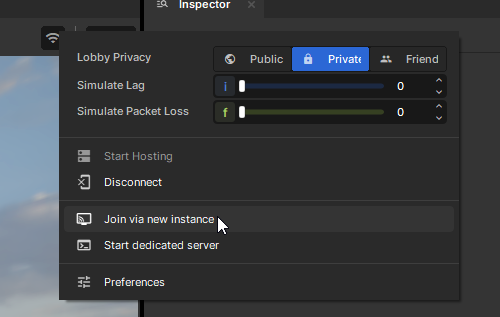
A new instance of the game will appear and join your game.
You can continue to code on your main instance, with the game running and the other instance joined. The code changes will be mirrored to the other client. In fact, they'll be mirrored to all clients - so even if you have a friend join, their game will update.
If you need to reconnect, you can do this via the reconnect command.
Choose Migrate host to new instance from the same menu. An instance is spawned, joins, and the editor hands the game to it once it's in. Any other instances rejoin it. With instances already joined, plain Disconnect does the handoff too. See Host Migration for what to look for.
If a new instance never connects, Windows may have reserved the loopback port the instances use. Run net_local_port 45333 in the editor console before hosting.
You can open an instance and manually join your local editor session by running connect local in the console.