


This class is part of the standard shading model, which allows fetching proper diffuse light contribution from appropriate sources on scene.
Use it directly when implementing your own Shading Model. ShadingModelStandard already handles ambient light for you.
From
float3 AmbientLight::From( float3 WorldPosition, float4 PositionSs, float3 WorldNormal )
WorldPosition: world-space pixel position,i.vPositionWithOffsetWs + g_vHighPrecisionLightingOffsetWs.xyz, orm.WorldPositionfrom an initialized materialPositionSs: screen-space position data,i.vPositionSsin standard pixel input structWorldNormal: normalized world-space surface normal
This method will return diffuse ambient light from one of the sources on scene in current order of priority:
- DDGI, when
DDGI::IsEnabled()is true - Lightmap probes, when
UsesBakedLightingFromProbeis true - Environment probes, blended with the sky color using its alpha
On the environment-probe path, a sky color alpha of one replaces the sampled probe lighting with the sky color. An alpha of zero keeps the probe lighting, and values in between blend the two. If no probe contributes at the position, only the sky color multiplied by its alpha remains.
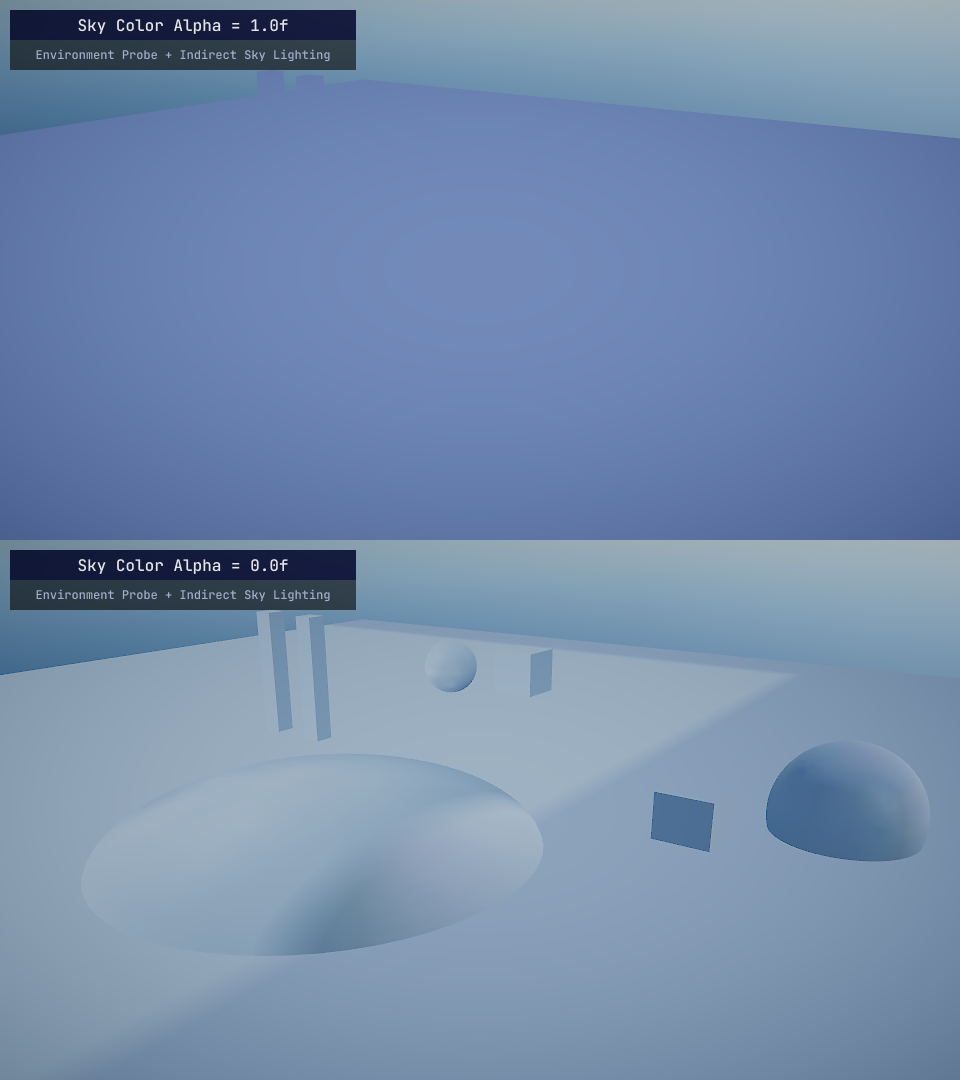
When DDGI is enabled, From uses that path even outside its volumes; it does not fall back to probes when the DDGI sample is zero. You can also sample each source directly using the functions below.
FromDDGI
Samples ambient light produced by an Indirect Light Volume. Returns 0 when there is no valid volume at the position, including outside the volumes or when the selected volume has no irradiance texture.
float3 AmbientLight::FromDDGI( float3 WorldPosition, float3 WorldNormal )
FromEnvMapProbe
Samples ambient light from environment probes and blends it with the sky color. See From above for the alpha behavior.
float3 AmbientLight::FromEnvMapProbe( float3 WorldPosition, float4 PositionSs, float3 WorldNormal )
FromLightMapProbeVolume
This will draw ambient light produced from lightmap probes.
float3 AmbientLight::FromLightMapProbeVolume( float3 WorldPosition, float3 WorldNormal )