Our UI system is structured around Panels. A Panel is a c# class that can have parent and child panels.
The panels use a stylesheet and flex system for layout and rendering.
They can be created directly in code or via Razor files with HTML/CSS syntax.
Here's a basic example of a Panel that simply displays Time.Now:
public class MyPanel : Panel
{
  public Label MyLabel { get; set; }

  public MyPanel()
  {
    MyLabel = new Label();
    MyLabel.Parent = this;
  }

  public override void Tick()
  {
    MyLabel.Text = $"{Time.Now}";
  }
}
Once you've created a Panel, it can be used in two different ways. The first is done identically to how we added a Label in the example above:
var myPanel = new MyPanel();
myPanel.Parent = this;
The other is by using the following syntax within a Razor Panels file:
<MyPanel />
To draw your UI to either the Screen or to a World Panel, you'll need to create a PanelComponent. A PanelComponent acts as the root of all UI, and is added to any GameObject with either a ScreenPanel or WorldPanel component. Here's an example of how you can create a basic one including the above panel:
public sealed class MyRootPanel : PanelComponent
{
	MyPanel myPanel;

	protected override void OnTreeFirstBuilt()
	{
		base.OnTreeFirstBuilt();

		myPanel = new MyPanel();
		myPanel.Parent = Panel;
	}
}
Panels can also draw shapes, lines, text and images directly from code by overriding OnDraw( Painter painter ). See Painter.
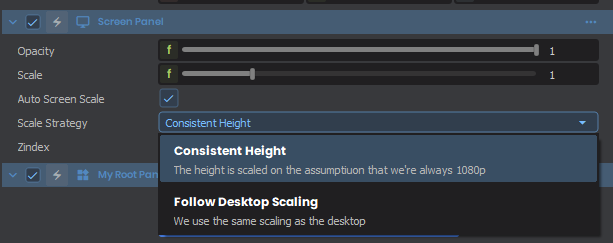
By default, ScreenPanels will rescale all UI based on a 1080p target height automatically. If you wish to disable this, or change the scaling to target the Desktop Resolution, you can change the following: