


You can define your own custom asset types as GameResources. They give you a nice inspector window and they're hotloaded in-game, which means you can whip things up pretty quickly if you're using them.
You can find plenty of examples of assets throughout s&box, here's a snippet from a clothing asset:
// Custom Asset named "Clothing Definition" with the extension ".clothing"
[AssetType( Name = "Clothing Definition", Extension = "clothing", Category = "citizen" )]
public partial class Clothing : GameResource
{
	public string Title { get; set; }

	[ResourceType( "vmdl" )]
	public string Model { get; set; }

	[Hide]
	public int Amount { get; set; }

	[JsonIgnore]
	public int MySecretNumber => 10;

	protected override Bitmap CreateAssetTypeIcon( int width, int height )
	{
		return CreateSimpleAssetTypeIcon( "checkroom", width, height, "#fdea60", "black" );
	}
}
It is important to note:
- You should ensure that your filetype is all lowercase and less than or equal to 8 characters, otherwise it will fail to register/save
- These are just JSON files with pretty faces and file types easy for the game to locate (and for developers to work with)
Now that you've created the GameResource class, it should automatically be added to the "New" menu in the Asset Browser. If you didn't specify a Category, then it will show under "Other".
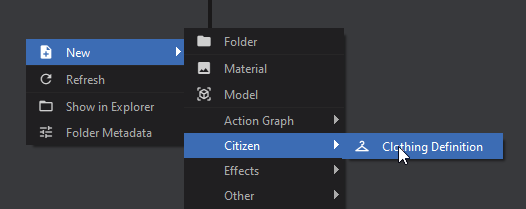
All assets are loaded when you first start the game, and there are several ways you can access them:
ResourceLibrary.Get<T>
// Load the resource from a path
// If the asset isn't found, this returns null
Clothing = ResourceLibrary.Get<Clothing>( "config/tshirt.clothing" );
ResourceLibrary.TryGet<T>
// Serves a similar purpose to Get<T> but returns a bool indicating
// whether the resource could be found. If the resource was found,
// the method provides it through an `out` parameter.
if( ResourceLibrary.TryGet<Clothing>( "config/tshirt.clothing", out var loadedClothing ) )
{
  Clothing = loadedClothing;
}
else
{
  // Resource couldn't be found, handle that here...
}
PostLoad
When assets are loaded they call their PostLoad method. You can use this to store a list of your assets.
public partial class Clothing : GameResource
{
	// Access these statically with Clothing.All
	public static IReadOnlyList<Clothing> All => _all;
	internal static List<Clothing> _all = new();

	protected override void PostLoad()
	{
		base.PostLoad();

        // Since you are constructing the list yourself, you could add your own logic here
        // to create lists for All, AllHats, AllShirts, AllShoes, etc.
		if ( !_all.Contains( this ) )
			_all.Add( this );
	}
}
You can use any of the Attributes you'd normally use on Properties (just like Components)