s&box
RustCounter-Strike 2s&boxDeadlock
Wiki
Get s&box on Steam
Browse
OverviewGetting StartedCreating GamesEngine & ToolsDocumentationCommunity GamesResources
s&boxDocumentationGetting StartedFirst Project
SOURCE 2 · C#
Build and play games with s&box.

Facepunch's game engine and creation platform — make games in C#, or jump straight into community games.

Get s&box on Steam

s&box Wiki

  • Overview
  • Getting Started
  • Creating Games
  • Engine & Tools
  • Documentation
  • Community Games
  • Resources

Tools & Community

  • Getting Started
  • Creating Games
  • Engine & Tools
  • Resources

Platforms

  • RustBattle
  • CSBattle
  • Rust Game Wiki
  • CS2 Skins Wiki
  • Deadlock Wiki

About

  • Official Site
  • Developer Wiki
  • GitHub
  • Get on Steam
NOT AFFILIATED WITH FACEPUNCH STUDIOS · © 2026 s&box Wiki (community)
Docs/Getting Started
Getting Started

Your First Project

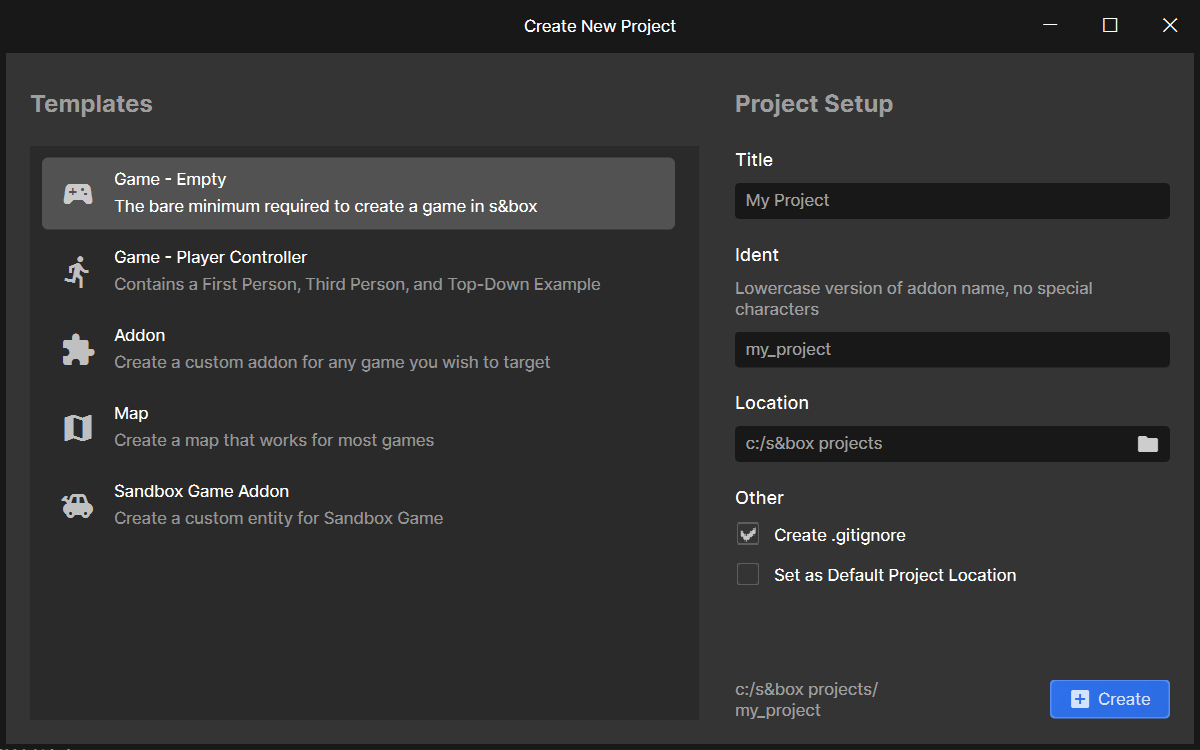
The best way to learn is to do. Open the s&box editor and on the welcome screen, choose New Project. Create a Game - Empty project.
Creating Game Objects

Once open you have an empty scene. You can experiment by creating GameObjects by right clicking the tree on the left, and selecting an object type to create.

Creating Components

After that, try to make a GameObject that you can control by creating a custom component by selecting Add Component on the GameObject inspector and typing in a name. The file should open in Visual Studio.

Player Input

Use the Input section of this site to figure out how to read keys, and change the WorldPosition depending on which keys are being pressed.

After that, maybe control the position of the camera too, either by parenting it to your object, or by setting the position directly using Scene.Camera.WorldPosition.

:::success Congratulations - you just learned the basics of GameObjects and Components. You're a game developer now. :::

Source: Facepunch/sbox-docs (CC-BY-4.0) · updated 2026-04-09. Read it rendered on the official docs.

More in Getting Started

Addon Project
Download & Install
Explore the Engine
FAQ
Game Project
Getting Started
Monetization
Project Types
← All documentation

Community wiki — not affiliated with Facepunch Studios. For the latest and most authoritative information, see the official developer wiki.