s&box
RustCounter-Strike 2s&boxDeadlock
Wiki
Get s&box on Steam
Browse
OverviewGetting StartedCreating GamesEngine & ToolsDocumentationCommunity GamesResources
s&boxDocumentationRenderingShader GraphProperties
SOURCE 2 · C#
Build and play games with s&box.

Facepunch's game engine and creation platform — make games in C#, or jump straight into community games.

Get s&box on Steam

s&box Wiki

  • Overview
  • Getting Started
  • Creating Games
  • Engine & Tools
  • Documentation
  • Community Games
  • Resources

Tools & Community

  • Getting Started
  • Creating Games
  • Engine & Tools
  • Resources

Platforms

  • RustBattle
  • CSBattle
  • Rust Game Wiki
  • CS2 Skins Wiki
  • Deadlock Wiki

About

  • Official Site
  • Developer Wiki
  • GitHub
  • Get on Steam
NOT AFFILIATED WITH FACEPUNCH STUDIOS · © 2026 s&box Wiki (community)
Docs/Rendering
Rendering

Properties

There are a few basic properties that each Shader Graph has that affect the way the resulting Shader is drawn and how it can be used.
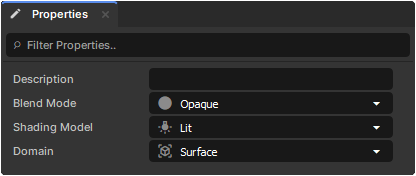
Determines whether or not the Shader should support Opacity, and how it should be handled.

  • Opaque - Always full opacity, no support for transparency.
  • Masked - No transparency support, but will use dithering with anything in-between 0 and 1.
  • Translucent - Full transparency support, allows you to see-through any opacities between 0 and 1.

Determines whether or not the Shader should be affected by lighting.

  • Lit - Light will affect the material and can support Emissions, Normals, Roughness, Metalness, and Ambient Occlusion.
  • Unlit - The material will output the raw colour to the screen regardless of the lighting in the Scene.

Determines how/where the shader should be used.

  • Surface - Used for any materials that will be used on 3D Objects placed within your scene. Can have a set Shading Model.
  • Post Process - Used for post-processing materials that will be applied to the screen. Uses Screen Coordinates instead of Texture Coordinates.

Source: Facepunch/sbox-docs (CC-BY-4.0) · updated 2025-08-20. Read it rendered on the official docs.

More in Rendering

AmbientLight
Animated Effects
Attributes and Variables
BeamEffect
Beams
Bindless API
C# Shader Nodes
Classes
← All documentation

Community wiki — not affiliated with Facepunch Studios. For the latest and most authoritative information, see the official developer wiki.