s&box
RustCounter-Strike 2s&boxDeadlock
Wiki
Get s&box on Steam
Browse
OverviewGetting StartedCreating GamesEngine & ToolsDocumentationCommunity GamesResources
s&boxDocumentationRenderingShadersGetting Started
SOURCE 2 · C#
Build and play games with s&box.

Facepunch's game engine and creation platform — make games in C#, or jump straight into community games.

Get s&box on Steam

s&box Wiki

  • Overview
  • Getting Started
  • Creating Games
  • Engine & Tools
  • Documentation
  • Community Games
  • Resources

Tools & Community

  • Getting Started
  • Creating Games
  • Engine & Tools
  • Resources

Platforms

  • RustBattle
  • CSBattle
  • Rust Game Wiki
  • CS2 Skins Wiki
  • Deadlock Wiki

About

  • Official Site
  • Developer Wiki
  • GitHub
  • Get on Steam
NOT AFFILIATED WITH FACEPUNCH STUDIOS · © 2026 s&box Wiki (community)
Docs/Rendering
Rendering

Getting Started

You can create different types of shaders in s&box through code or the ShaderGraph.

  • Material Shaders: Rendering of objects in world space
  • Post Processing Shaders: Full screen
  • Compute Shaders

Shaders can be created from the Asset Browser, they are written in HLSL in a VFX wrapper combining vertex and pixel stages together.

When you save a shader it is automatically recompiled and hotloaded showing you the results instantly.

Code Editor

The recommended setup for editing shader code is VSCode with the Slang Extension, this gives you a full IDE experience with intellisense which shows you what functions and properties you can use.
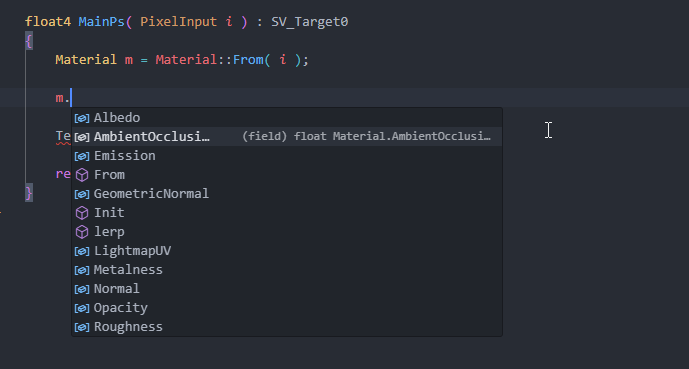
Opening your project folder in VSCode will prompt you to install the Slang extension, and automatically sets up file extension associations, workspace flavor and search paths.

If you're having trouble make sure your language mode is set to Slang and your workspace flavor is set to vfx.

Source: Facepunch/sbox-docs (CC-BY-4.0) · updated 2026-01-13. Read it rendered on the official docs.

More in Rendering

AmbientLight
Animated Effects
Attributes and Variables
BeamEffect
Beams
Bindless API
C# Shader Nodes
Classes
← All documentation

Community wiki — not affiliated with Facepunch Studios. For the latest and most authoritative information, see the official developer wiki.