s&box
RustCounter-Strike 2s&boxDeadlock
Wiki
Get s&box on Steam
Browse
OverviewGetting StartedCreating GamesEngine & ToolsDocumentationCommunity GamesResources
s&boxDocumentationEditorEditor Apps
SOURCE 2 · C#
Build and play games with s&box.

Facepunch's game engine and creation platform — make games in C#, or jump straight into community games.

Get s&box on Steam

s&box Wiki

  • Overview
  • Getting Started
  • Creating Games
  • Engine & Tools
  • Documentation
  • Community Games
  • Resources

Tools & Community

  • Getting Started
  • Creating Games
  • Engine & Tools
  • Resources

Platforms

  • RustBattle
  • CSBattle
  • Rust Game Wiki
  • CS2 Skins Wiki
  • Deadlock Wiki

About

  • Official Site
  • Developer Wiki
  • GitHub
  • Get on Steam
NOT AFFILIATED WITH FACEPUNCH STUDIOS · © 2026 s&box Wiki (community)
Docs/Editor
Editor

Editor Apps

Editor Apps are apps that run in the editor. They generally have their own window. They're sometimes used to edit specific types of asset.

Examples of editor apps are the ShaderGraph, Material Editor, Model Editor.

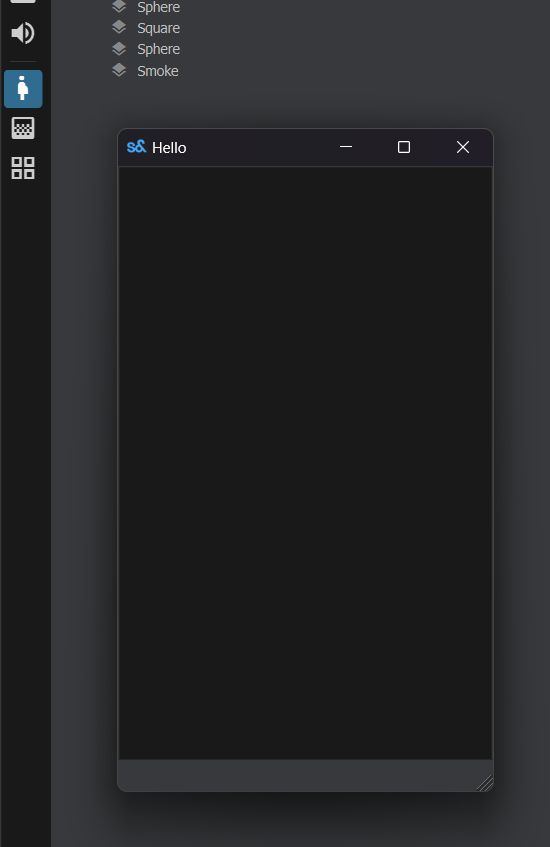
To create an Editor App, you just need to add an [EditorApp] attribute to its main window.

[EditorApp( "Example App", "pregnant_woman", "Inspect Butts" )]
public class MyEditorApp : Window
{
	public MyEditorApp()
	{
		WindowTitle = "Hello";
		MinimumSize = new Vector2( 300, 500 );
	}
}

The app will be available on the App sidebar and the Apps menu.
Source: Facepunch/sbox-docs (CC-BY-4.0) · updated 2023-12-29. Read it rendered on the official docs.

More in Editor

Asset Previews
Component Editor Tools
Custom Editors
Editor
Editor Events
Editor Project
Editor Shortcuts
Editor Tools
← All documentation

Community wiki — not affiliated with Facepunch Studios. For the latest and most authoritative information, see the official developer wiki.