s&box
RustCounter-Strike 2s&boxDeadlock
Wiki
Get s&box on Steam
Browse
OverviewGetting StartedCreating GamesEngine & ToolsDocumentationCommunity GamesResources
s&boxDocumentationEditorEditor Project
SOURCE 2 · C#
Build and play games with s&box.

Facepunch's game engine and creation platform — make games in C#, or jump straight into community games.

Get s&box on Steam

s&box Wiki

  • Overview
  • Getting Started
  • Creating Games
  • Engine & Tools
  • Documentation
  • Community Games
  • Resources

Tools & Community

  • Getting Started
  • Creating Games
  • Engine & Tools
  • Resources

Platforms

  • RustBattle
  • CSBattle
  • Rust Game Wiki
  • CS2 Skins Wiki
  • Deadlock Wiki

About

  • Official Site
  • Developer Wiki
  • GitHub
  • Get on Steam
NOT AFFILIATED WITH FACEPUNCH STUDIOS · © 2026 s&box Wiki (community)
Docs/Editor
Editor

Editor Project

Your game can have an editor component to it. Your game's editor project is special in that it can access both the tools and the game code.

:::warning Editor projects are not sandboxed. They are not limited by any whitelists and can run any functions. You should be careful when running code you have received from an untrusted source - because it can do almost anything.

:::

To create an editor project you simply create a folder named "editor" in your project folder. Any code in this folder will be treated as part of the editor project.

You will get a new project in your IDE called <projectname>.editor.
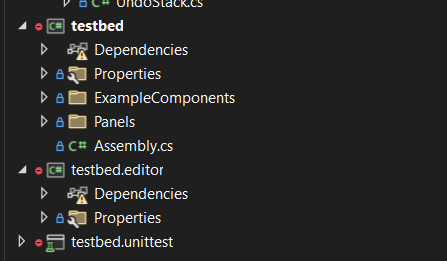
Creating an editor project lets you do a few special things.

  • Create Editor Widgets
  • Create Editor Tools
  • Create Custom Inspectors for your Components or GameResources
  • Create new Control Widgets
  • Create new Editor Docks
  • Create Editor Apps
  • Create Asset Previews

Source: Facepunch/sbox-docs (CC-BY-4.0) · updated 2024-12-17. Read it rendered on the official docs.

More in Editor

Asset Previews
Component Editor Tools
Custom Editors
Editor
Editor Apps
Editor Events
Editor Shortcuts
Editor Tools
← All documentation

Community wiki — not affiliated with Facepunch Studios. For the latest and most authoritative information, see the official developer wiki.