


To add Terrain to your Scene, right click in the Hierarchy and select 3D Object → Terrain from the menu. The Terrain inspector creates a blank Terrain asset for you, which you can edit straight away or swap for an existing Terrain asset.
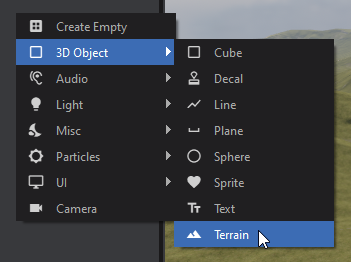
Create New Terrain
Once you've created a Terrain GameObject it comes with a blank Terrain asset which stores all the height maps, control maps, materials, etc. It is embedded in the scene by default, but a saved .terrain asset can be reused across multiple scenes.
In the inspector window with the Terrain GameObject selected you can set how large you want your terrain to be under the Settings tab.
| Resolution | The size of your heightmap, from 256 x 256 up to 8192 x 8192 (default 512 x 512).Higher values increase VRAM usage drastically for combined heightmap and control maps:2048 x 2048 = 24MB4096 x 4096 = 96MB8192 x 8192 = 384MB |
|---|---|
| Terrain Size | The uniform world size of the width and length of the terrain in inches (default 20000).A smaller size gives more precision at the reduction of overall size.<br>A larger size gives more overall size at the reduction of precision. |
| Terrain Height | The maximum height your terrain will be in inches (default 10000).The higher this is the less precision you get at lower values. |
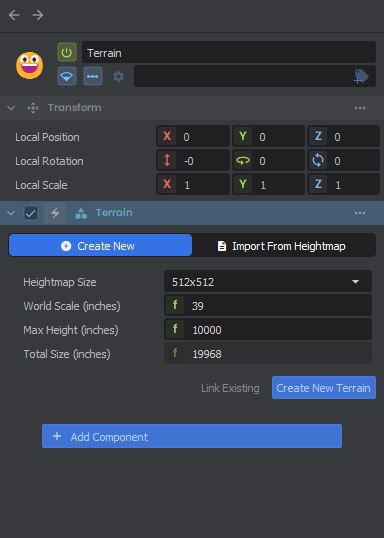
Link Existing Terrain
If you already have a terrain created in one scene that you want to reuse you can either drag the terrain asset in to automatically create the object, or assign the existing Terrain asset to the Storage property of the Terrain component.